Facebook ID Finder – Find a Profile, Page or Group ID
Paste a link to a public Facebook profile, Page or group — or just type a username — and get the numeric ID Facebook knows it by, ready to copy. The name, the profile picture and the cover come with it. Free, with no login and no app.
How to Find a Facebook ID in 3 Steps
-
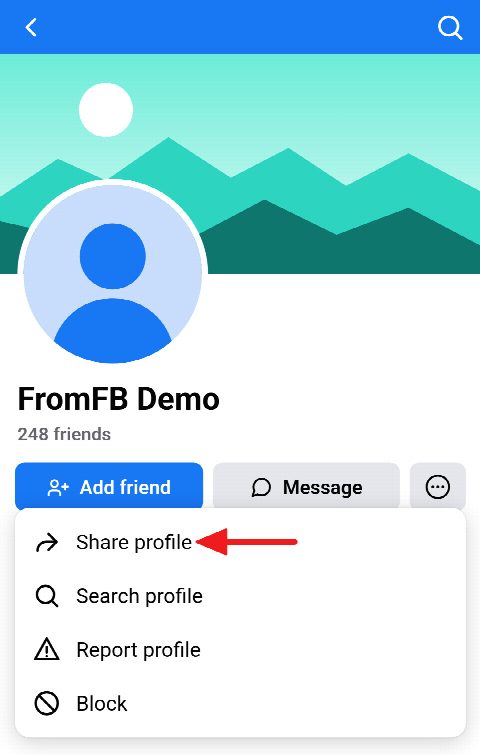
Open the profile and tap Share
In the Facebook app, open the profile, Page or group whose ID you need, tap the ⋯ menu and choose Share. On a computer, the address bar already holds the link.
-
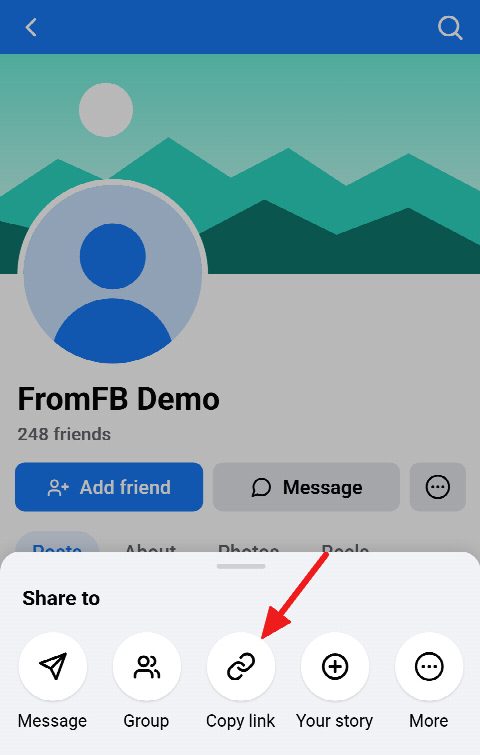
Copy the link
Choose Copy link. It may look like facebook.com/name, facebook.com/profile.php?id=… or facebook.com/share/… — all of them work, and so does a username on its own.
-
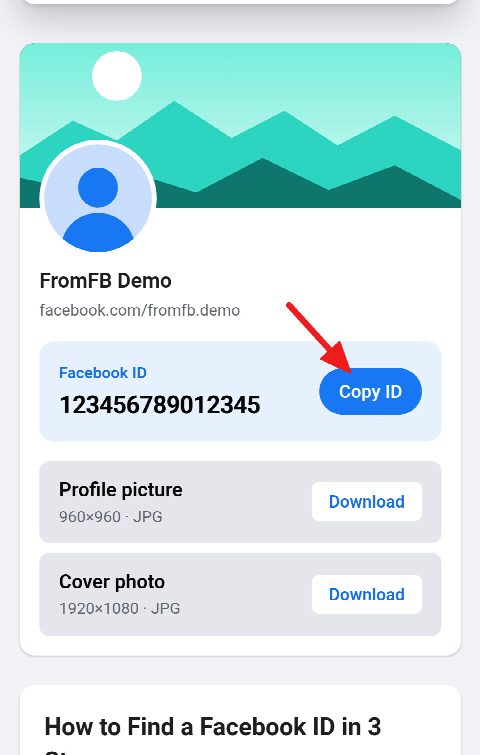
Paste it and copy the ID
Paste the link into the field above and press Download. The numeric ID appears at the top of the card; tap Copy ID to put it on your clipboard.


Find a Facebook ID by Link or Username
-
Profile ID
The number behind a personal profile — the same one a facebook.com/profile.php?id=… link shows — even when the profile goes by a username.
-
Page ID
The ID of the Facebook Page of a business, a brand or a public figure, which ad tools, website plugins and the Graph API ask for.
-
Group ID
The ID of a public group, from its facebook.com/groups/… link or from the share link the app copies.
-
Link, username or ID
Paste any link to the profile, Page or group, a share link that leads to it, or type the username on its own, with or without the @.
-
Copy in one tap
The ID sits at the top of the card in large type, next to a button that copies it, so not a digit gets mistyped.
-
Picture and cover too
The same card shows the name, the profile picture and the cover photo, each ready to download in full size.
What Is a Facebook ID and How Is It Different from a Username?
Every profile, Page and group on Facebook has a numeric ID: a unique number given once and never changed. A username — the facebook.com/name part that some profiles and Pages choose — is a nickname on top of it. It can be changed, given up or never set at all, and then the address shows the number instead, as profile.php?id=….
Because the number stays the same while names come and go, it is what software asks for. Ad and analytics tools, website plugins, comment pickers and the Graph API all identify a profile, Page or group by its ID rather than by its name.
Find Your Own Facebook Profile ID
Your own ID is found the same way as anyone else’s: get the link to your profile and paste it here.
In the Facebook app
Tap your picture to open your profile, then the ⋯ button next to Edit profile, and choose the option to copy your profile link. Paste the link above and your ID is at the top of the card.
On a computer
Open Facebook, click your name to go to your profile and copy the address from the address bar. If it already reads profile.php?id=…, the digits after id= are your ID; if it shows your username, paste it here.
Find a Facebook Page ID
Open the Page, tap ⋯ and choose Share, then Copy link — or copy the address from the browser. Paste it here and the Page ID appears with the Page’s name and pictures. Facebook also lists the ID on the Page itself, usually in its Page transparency section, but this is quicker and needs no login.
Find a Facebook Group ID
Open the group, tap Share and choose Copy link. A group’s address looks like facebook.com/groups/name or facebook.com/groups/ followed by digits; if it shows digits, they are the ID already. The facebook.com/share/g/… link the app copies works too.
If a group can’t be found, it is usually one that Facebook hides from everyone who isn’t a member.
Why You Might Need a Facebook ID
Ad and analytics tools ask for a Page ID to connect a Page. Website plugins — a Page feed, a chat button, a reviews widget — want the Page or group ID. Developers use IDs with the Graph API, and giveaway and comment tools take them to know exactly which profile is meant.
An ID is also the one way of pointing at a profile that keeps working after its owner changes their name or username.
Frequently asked questions
Is this Facebook ID finder free, and do I need to log in?
It is free, with no account and no limit, and you never log in to Facebook here. The tool reads only what Facebook shows to anyone who is not signed in.
Can I find a Facebook ID by name, email or phone number?
No. Facebook doesn’t let outside tools look profiles up that way, so you need the profile’s link or username. Search for the person or Page on Facebook, open their profile and copy the link from there.
Why can’t the tool find an ID for some profiles?
A profile that has been deleted, deactivated or locked, or that Facebook shows only to people who are signed in, can’t be read from outside. Check that the link opens in a private browser window where you are not logged in.
Does a Facebook ID change if I change my username?
No. The ID is given once, when the profile, Page or group is created, and stays the same through every change of name or username.
Which links and usernames work?
facebook.com/name, facebook.com/profile.php?id=…, facebook.com/people/…, facebook.com/groups/…, the facebook.com/share/… links the app copies, and a username typed on its own, with or without the @.
Is the person notified when I look up their ID?
No. The lookup reads the public profile the way a visitor without an account would, and Facebook doesn’t tell anyone about it.
Which Facebook identifier does the ESTA form ask for?
The ESTA application asks for a social media identifier for each platform, which is generally your username there rather than the numeric ID. A profile without a username shows its numeric ID in its link instead, and this tool finds it. The form’s own instructions are the final word, and they do change, so check them when you apply.