Facebook Video & Reels Thumbnail Downloader
Paste the link to a public Facebook video or Reel and save its thumbnail — the cover frame Facebook shows before the video plays — as a JPG, exactly as Facebook stores it. The video itself is on the same card. Free, with no login and no app, on iPhone, Android and PC.
How to Download a Facebook Video Thumbnail
-
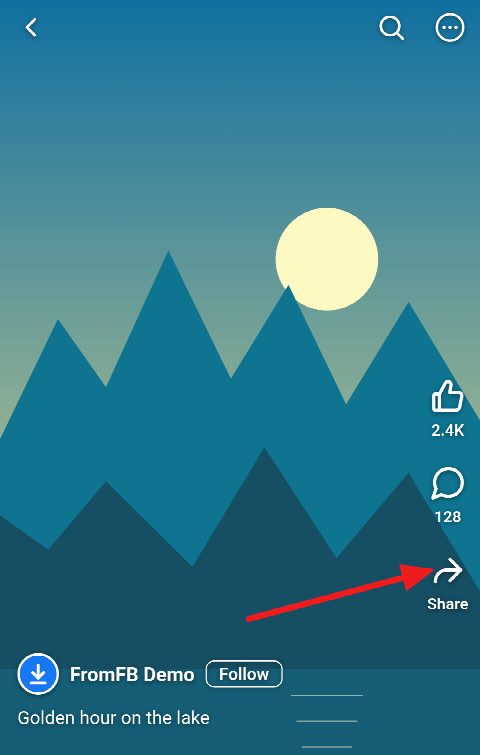
Open the video or Reel and tap Share
In the Facebook app or a browser, open the video or Reel whose thumbnail you want and tap Share under it.
-
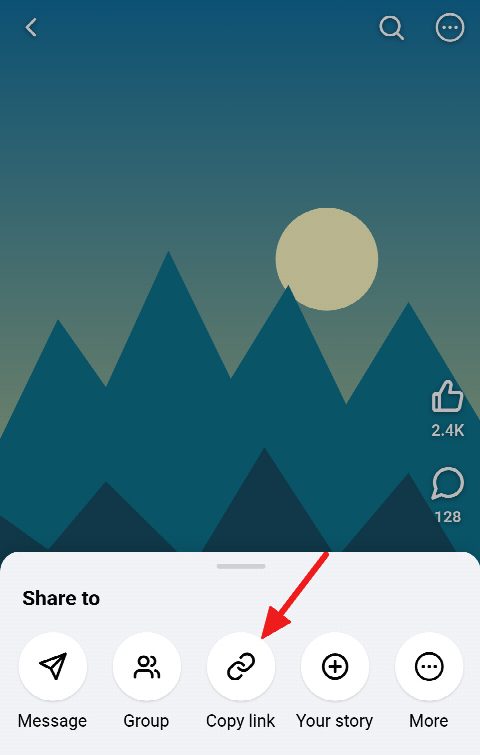
Copy the link
Choose Copy link. A Reel’s link looks like facebook.com/reel/… or facebook.com/share/r/…, a video’s like facebook.com/watch?v=… or fb.watch/…
-
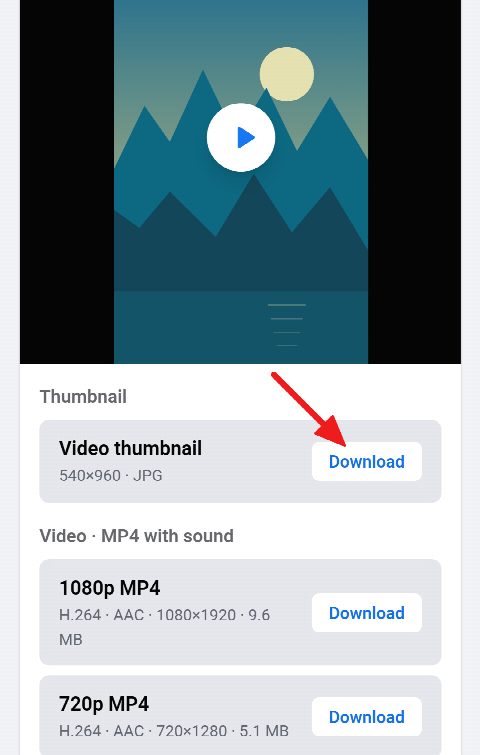
Paste and save the thumbnail
Paste the link into the field above and press Download. The thumbnail is at the top of the card with its size; press Download beside it to save the JPG.


Get the Cover Image of Any Public Facebook Video
-
The cover frame, as stored
You get the picture Facebook shows before the video plays, in the size Facebook keeps it — not a screenshot, not compressed again and with no watermark.
-
Videos and Reels
Works for Reels, Facebook Watch videos, Page videos, and videos in public posts and public groups.
-
Share links work
Paste the link the app copies — facebook.com/share/r/…, facebook.com/share/v/… or fb.watch/… — and it is followed to the video behind it.
-
The video too
The same card offers the video itself as an MP4 with sound, and its audio as an MP3, in case you need more than the picture.
-
Size shown first
The card tells you the thumbnail’s width and height before you download it, so there are no surprises.
-
Free, no login, any device
No account, no app and no extension. It runs in the browser on iPhone, Android, Windows PC, Mac and Linux.
Get the Thumbnail from Facebook Reels
A Reel’s thumbnail is the cover its creator picked, or the frame Facebook picked for them, and it is what people see in the Reels tab and the feed before they tap. Paste the Reel’s link — facebook.com/reel/…, or the facebook.com/share/r/… link the app copies — and that picture is the first thing on the card.
Reels are vertical, so their thumbnails are too: a tall 9:16 picture, ready for a moodboard, a reference folder or a note to yourself about what worked.
What You Get: the Cover Frame Facebook Shows
The file is the poster Facebook serves for the video, saved as Facebook keeps it: not cropped, not resized and not compressed again. Facebook stores it smaller than the video itself. In our checks the longer side is usually 960 pixels — 540×960 for a vertical Reel, 768×960 for a 4:5 video — even when the video is in Full HD. The card shows the exact size before you download.
Need a frame at the video’s full resolution? Download the video in 1080p from the same card, pause it on the moment you want and take a screenshot.
Why Some Thumbnails Can’t Be Saved
The video has to be public. A private video, one shared with friends only, a post in a closed group or a Story can’t be read without logging in, and this tool never logs in. Videos longer than 5 minutes are refused as well, thumbnail included.
Now and then Facebook keeps no thumbnail for a video at all. The card then says so, and still offers the video.
Frequently asked questions
How do I get the thumbnail from a Facebook video?
Copy the video’s link, paste it into the field on this page and press Download. The thumbnail is at the top of the card; press Download beside it to save it as a JPG.
Can I download a Facebook Reel thumbnail?
Yes. Paste the Reel’s link and its cover is saved the same way, as a tall 9:16 picture.
What size will the thumbnail be?
The size Facebook keeps it in, which is smaller than the video: usually 960 pixels on the longer side, such as 540×960 for a vertical Reel. The card shows the exact width and height before you download.
Is it the cover the creator chose?
It is the picture Facebook shows before the video plays: the cover the creator picked, if they picked one, or the frame Facebook chose otherwise.
Can I download the video too?
Yes. The same card offers the video as an MP4 with sound in every quality Facebook keeps, and its audio as an MP3 or M4A.
Does it work for private videos or Stories?
No. Only public videos can be read: this tool never logs in to Facebook, so private videos, friends-only posts, closed groups and Stories are out of its reach.
Can I reuse a downloaded thumbnail?
The thumbnail belongs to whoever made the video. Keep it for your own reference, and ask the creator before you publish it or use it in your own work.