Facebook Photo and Album Downloader
Paste a link to a public Facebook photo, post or album and save the pictures online in full size and full resolution — the original quality JPG or PNG, one photo at a time or the entire album in one ZIP archive. Free, no login, no app, on iPhone, Android, PC and Mac.
How to Download Facebook Photos and Albums
-
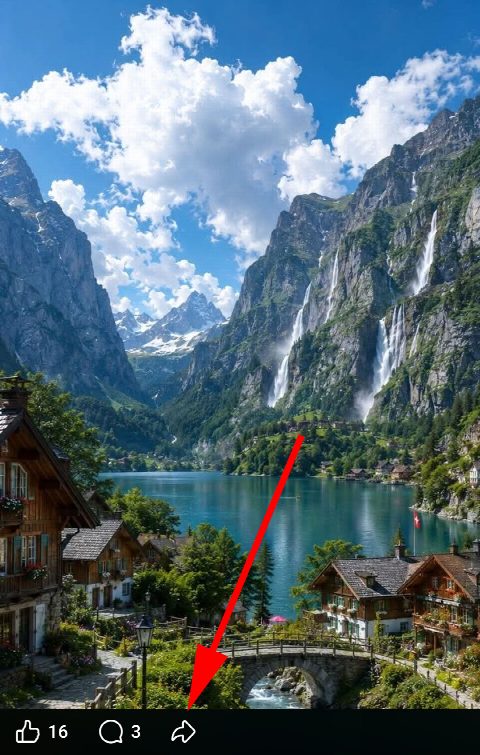
Open the photo or album
Open the photo, the post or the album in the Facebook app or in a browser. For a whole album, open the album page itself.
-
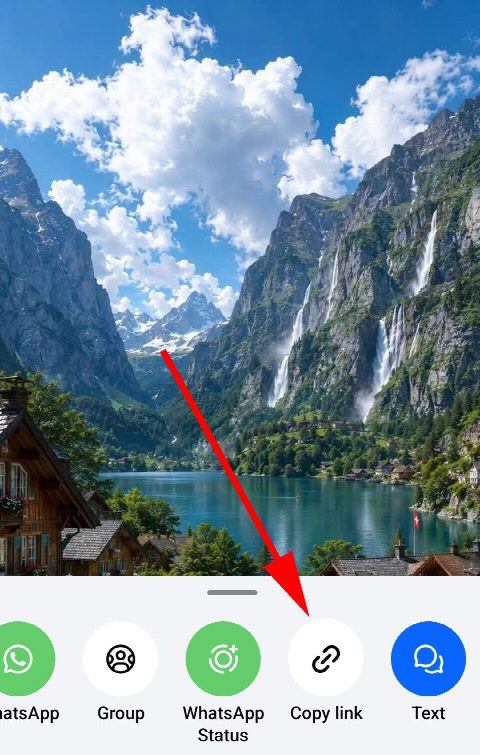
Copy the link
Tap Share and choose Copy link, or copy the address from the browser bar. It looks like facebook.com/photo/?fbid=…, facebook.com/…/posts/… or facebook.com/media/set/?set=a.…
-
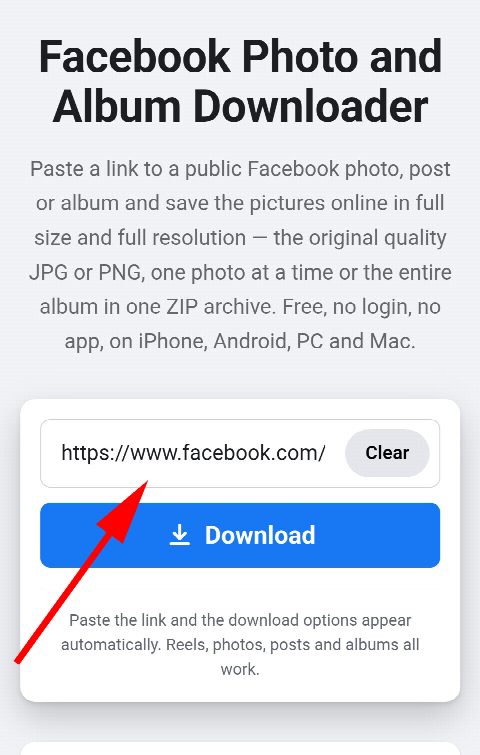
Paste and download
Paste the link into the field above — the photos appear on their own, in full size. Save any single picture with its Download button, or take all photos of an album or post at once as a ZIP file.


Download Full Facebook Albums in HD
-
Full size, full resolution
Every photo is fetched at the largest size Facebook stores — the full resolution original in HD, not the preview thumbnail the feed shows.
-
Entire album at once
Paste an album link and every photo in it is collected for you. Download them one by one, or all photos together as a single ZIP archive — bulk download in one click.
-
Multiple photos from a post
A post with several pictures works the same way: all of them appear on one card, ready to save separately or as one ZIP.
-
JPG and PNG, original quality
Photos are saved in the format Facebook stores them — JPG for most pictures, PNG where the original is a PNG — with nothing re-compressed.
-
Free, online, no login
No account, no sign-up, no app to install and no limit on how many photos or albums you download. Everything happens in the browser.
-
Any device
Works on iPhone and iPad, Android phones and tablets, Windows PC, Mac and Linux. A ZIP opens on all of them.
Save Multiple Photos from a Facebook Post
Many Facebook posts carry more than one picture. Paste the link to the post — the one from Share → Copy link, or the address in the browser bar — and every photo in it is found and shown on one card, each with its own Download button. There is no need to open the pictures one at a time and save them separately.
The same goes for a single photo opened from a post: the card shows that photo in full size, and if it belongs to an album or a multi-photo post, a link under it offers the whole set.
Download Facebook Images in Full Size
Facebook shows every image scaled down for the feed and keeps the full resolution original behind it. This downloader always asks for that original — the full size the photo was uploaded in, up to the largest rendition Facebook stores — so what you save is the sharpest copy available, as a JPG or a PNG, in the original quality with no re-compression.
Only public content can be fetched: a photo from a public page, a public post or a public album. Pictures from a private profile, a friends-only post or a closed group are not visible without a login, and this site never logs in.
Facebook Album Downloader for iPhone, Android and PC
On iPhone and iPad, open this page in Safari and paste the album link. A single photo is saved to the Files app or straight to Photos, depending on your settings; a ZIP lands in Files, where a tap unpacks it into a folder of pictures you can move to Photos. On Android every photo and every ZIP goes to Downloads, and the built-in file manager opens the archive.
On a Windows PC, a Mac or Linux the ZIP downloads like any other file and opens with a double click. No app or extension is needed on any of these — a browser is enough.
Download Facebook Albums as a ZIP File
Paste the link to a public album — facebook.com/media/set/?set=a.… — and its photos are collected in the background while the first ones already appear on the card. When the album is complete, a Download all as ZIP button offers every photo in one archive, named so the pictures stay in the album’s order.
The archive is built on our server from the full size originals and is not compressed further: a JPG does not get smaller by zipping, and a stored archive opens instantly on a phone. Very large albums are cut at a hundred photos, and the card says so.
Save Multiple Facebook Photos in One ZIP Archive
A ZIP is the simplest way to save many photos at once: one download instead of dozens, one folder instead of a gallery full of loose files, and every picture in its original quality. It works for albums and for posts with several pictures alike — wherever the card shows more than one photo, the archive button appears once all of them are known.
Frequently asked questions
Which Facebook photo links work?
A single photo (facebook.com/photo/?fbid=… or the short facebook.com/share/… link the app copies), a post with one or several pictures (facebook.com/…/posts/… or facebook.com/share/p/…) and an album (facebook.com/media/set/?set=a.…). The content has to be public.
Are the photos full size?
Yes. Every photo is fetched at the largest resolution Facebook stores — the full size original, not the scaled-down copy shown in the feed — in its original quality.
What format do I get, JPG or PNG?
Whatever Facebook stores: JPG for most photos, PNG when the original is a PNG. Nothing is converted or re-compressed.
How do I download a whole album?
Paste the album link. The photos are collected while the first ones already show on the card; when the album is complete, a “Download all as ZIP” button offers every photo in one archive.
Is there a limit on album size?
The first hundred photos of an album are collected. Larger albums are cut there, and the card says so.
Does it work on iPhone and Android?
Yes. Photos and ZIPs are saved to Files on iOS and to Downloads on Android; both open a ZIP with a tap. Nothing needs installing.
Can I download photos from a private profile or a closed group?
No. Only what is public can be read: public pages, posts and albums, and posts in public groups. Anything that needs a login to see is out of reach, because this site never logs in to Facebook.
FromFB.app
Facebook Reels Downloader in HD MP4
Paste a Facebook Reels link and save the video online as a free HD MP4 with sound — in Full HD 1080p, 720p or any other quality Facebook stores, in original quality and without a watermark. No login, no app, unlimited downloads on iPhone, Android, PC and Mac.
FromFB.app
Facebook Reels Audio Downloader – MP3 320 kbps
Extract the sound or music from any public Facebook Reel and convert it to a high-quality MP3 at 320, 256, 192, 128, 96 or 64 kbps — or keep the original audio untouched as an M4A. Audio only, online, free, no login and no app, on iPhone, Android and PC.
FromFB.app
Facebook Profile Picture Viewer and Downloader
Paste a link to a Facebook profile or Page — or just type the username — to view the profile picture in full size and download the DP in HD, as it was uploaded rather than the small circle Facebook shows. The cover photo comes with it. Free, online, no login and no app.
FromFB.app
Facebook Cover Photo Viewer and Downloader
Paste a link to a Facebook profile, Page or public group — or type a username — to view the cover photo whole and download it in its original size, not the cropped strip across the top of the profile. HD JPG or PNG, free, online and with no login.