Facebook Profile Picture Viewer and Downloader
Paste a link to a Facebook profile or Page — or just type the username — to view the profile picture in full size and download the DP in HD, as it was uploaded rather than the small circle Facebook shows. The cover photo comes with it. Free, online, no login and no app.
How to Download a Facebook Profile Picture
-
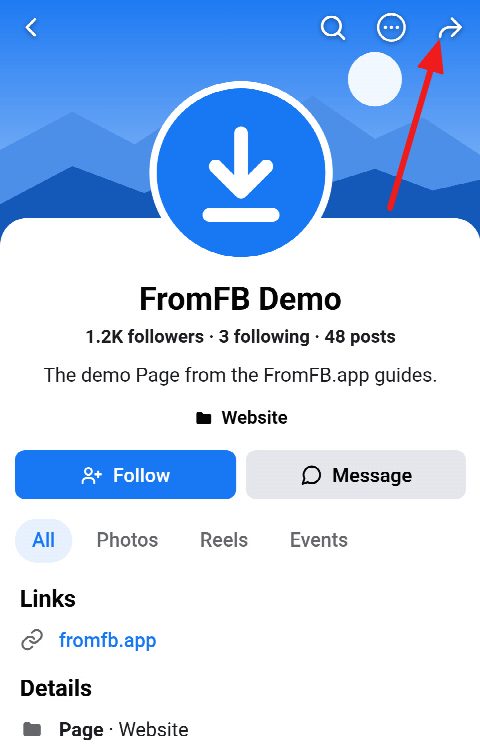
Open the profile and tap Share
Open the profile or the Page in the Facebook app — someone else’s, or your own — and tap the Share arrow at the top right.
-
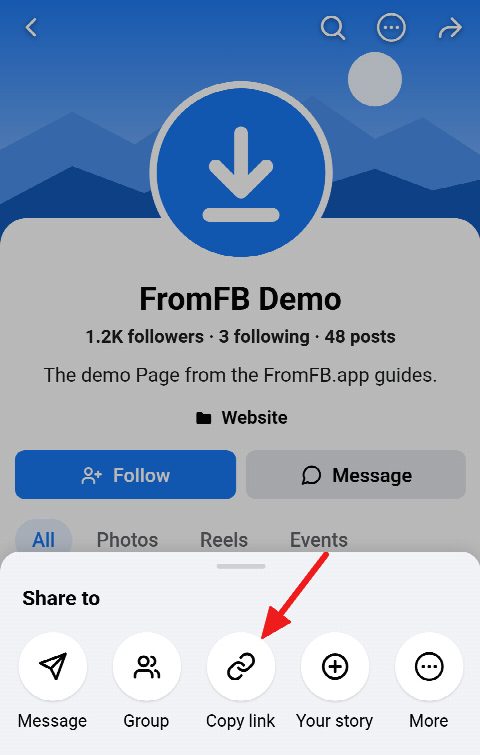
Copy the profile link
In the menu that opens, tap Copy link. In a browser, copy the address from the bar instead: facebook.com/username or facebook.com/profile.php?id=…. The username or the ID on its own works too.
-
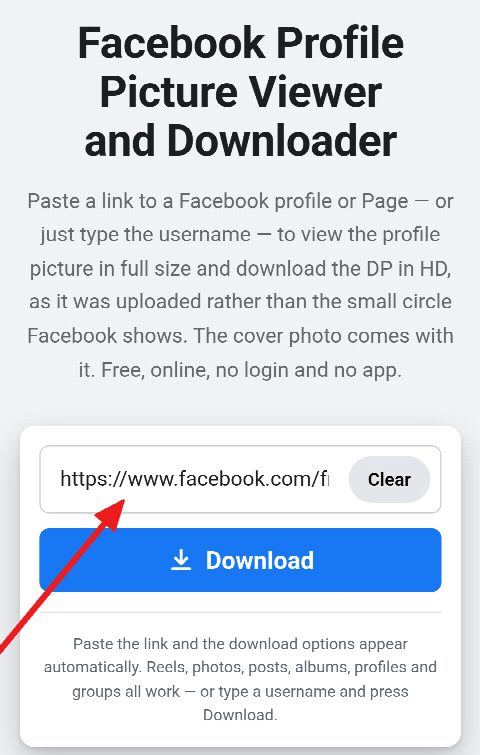
Paste and download
Paste it into the field above and press Download. The profile picture appears in full size with its own Download button, and the cover photo under it.


View Any Public Facebook Profile Picture in Full Size
-
Full size, not the circle
Facebook draws a profile picture as a small circle. This Facebook profile picture viewer shows the whole picture in the size it was uploaded in — often 2048×2048 pixels, in HD — and saves exactly that.
-
Link, username or ID
Paste the profile link or a share link that leads to the profile, or type the username or the numeric profile ID on its own.
-
Profiles and Pages
Works for personal profiles and for the Facebook Pages of brands, shops, artists and public figures.
-
Cover photo included
The same card offers the profile’s cover photo in its original size, so the DP and the cover are saved in one go.
-
Free, online, no login
No account, no sign-up, no app and no extension, and no limit on how many pictures you save. The person is not notified.
-
Any device
Works on iPhone, Android, Windows PC, Mac and Linux, in any browser. The picture is saved as a JPG or PNG in the original quality.
Download Someone’s Facebook Profile Picture by Link
To download someone’s Facebook profile picture, copy the link to their profile — from the address bar on a computer, or with Share → Copy link in the app — and paste it into the field above. Every kind of profile link works: facebook.com/username, the m.facebook.com address a phone opens, facebook.com/profile.php?id=… for a profile without a username, and the short facebook.com/share/… link the app copies.
The Facebook profile picture downloader reads the profile the way any visitor who is not logged in sees it and offers the profile picture in the size it was uploaded in. Nothing is posted, liked or viewed under your name, and the person is not notified.
Facebook Profile Picture Viewer by Username or ID
No link at hand? Type the username on its own — username, or @username — or the numeric ID of a profile, and press Download. The profile is looked up exactly as it is from a link, so the viewer works by username and by ID alike.
The username is the part of the profile address after facebook.com/. A profile that has none is known by its ID: the number after profile.php?id= in its address.
Download a Facebook Page Profile Picture
Facebook Pages — brands, shops, artists, public figures — have a profile picture and a cover photo just as personal profiles do, and both are public. Paste the Page’s link or type its username, and the Page’s logo or picture is offered in full size, ready to save as a JPG or PNG in the original quality.
Facebook Profile Picture and Cover Photo in One Click
Every profile card shows both pictures: the profile picture and the cover photo above it, each with its own size and Download button. A press on either opens it full screen, where you can zoom in before you save it.
When a profile keeps its pictures to itself, the card says so. Facebook still shows the profile picture of a locked profile to everyone, but only as a small square of about 200×200 pixels, and its cover photo only as a smaller copy; those are what can be saved, and the card says when a picture is the smaller version.
Facebook DP Downloader for iPhone, Android and PC
On iPhone and iPad, open this page in Safari, paste the link and press Download: the DP is saved to Photos or to the Files app, depending on your settings. On Android the picture goes to Downloads and shows up in the gallery. On a Windows PC, a Mac or Linux it downloads like any other file.
No app or browser extension is needed anywhere — the FB DP downloader runs in the browser, for free, with no limit on how many profile pictures you save.
Frequently asked questions
Can you download Facebook profile pictures?
Yes, as long as Facebook shows them publicly. Paste the profile link or type the username, and the picture is offered in full size with a Download button — for personal profiles and Pages alike.
What size is the downloaded profile picture?
The size it was uploaded in — the largest Facebook stores, often 2048×2048 pixels — and not the small circle Facebook draws. The card shows the exact size before you download.
Does Facebook notify the person?
No. The profile is read the way any visitor who is not logged in sees it, and nothing is done under your name, so nobody is told that their picture was viewed or saved.
Can I download my own profile picture?
Yes. Paste the link to your own profile or type your username, and the picture is offered in its original size — handy when the original file is no longer on your phone.
Can I paste just a username or ID?
Yes. Type the username, with or without @, or the numeric profile ID, and press Download. It works the same as a link.
Does it work with locked profiles?
Only in part. A locked profile shows its profile picture to everyone only as a small square of about 200×200 pixels, and its cover photo only as a smaller copy — those are what can be saved. Nothing behind a login can be reached, because this site never logs in to Facebook.
FromFB.app
Facebook Reels Downloader in HD MP4
Paste a Facebook Reels link and save the video online as a free HD MP4 with sound — in Full HD 1080p, 720p or any other quality Facebook stores, in original quality and without a watermark. No login, no app, unlimited downloads on iPhone, Android, PC and Mac.
FromFB.app
Facebook Photo and Album Downloader
Paste a link to a public Facebook photo, post or album and save the pictures online in full size and full resolution — the original quality JPG or PNG, one photo at a time or the entire album in one ZIP archive. Free, no login, no app, on iPhone, Android, PC and Mac.
FromFB.app
Facebook Reels Audio Downloader – MP3 320 kbps
Extract the sound or music from any public Facebook Reel and convert it to a high-quality MP3 at 320, 256, 192, 128, 96 or 64 kbps — or keep the original audio untouched as an M4A. Audio only, online, free, no login and no app, on iPhone, Android and PC.
FromFB.app
Facebook Cover Photo Viewer and Downloader
Paste a link to a Facebook profile, Page or public group — or type a username — to view the cover photo whole and download it in its original size, not the cropped strip across the top of the profile. HD JPG or PNG, free, online and with no login.