Facebook Video Downloader – HD MP4 with Sound
Paste the link to a public Facebook video and save it as an MP4 with sound in every quality Facebook keeps — up to Full HD 1080p, in its original quality and without a watermark. Watch videos, Page videos, fb.watch links and videos in public posts all work, on iPhone, Android, PC and Mac, with no login and no app.
How to Download a Facebook Video in 3 Steps
-
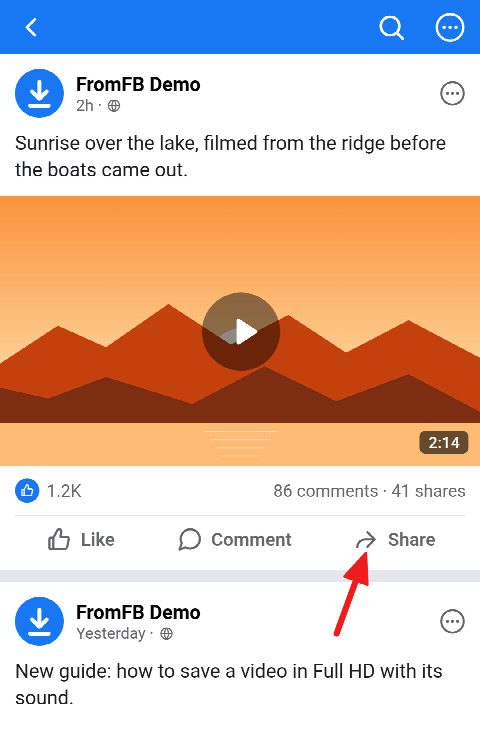
Open the video and tap Share
In the Facebook app or in a browser, open the video you want to save and tap Share under it. On a computer you can also copy the address straight from the address bar while the video plays.
-
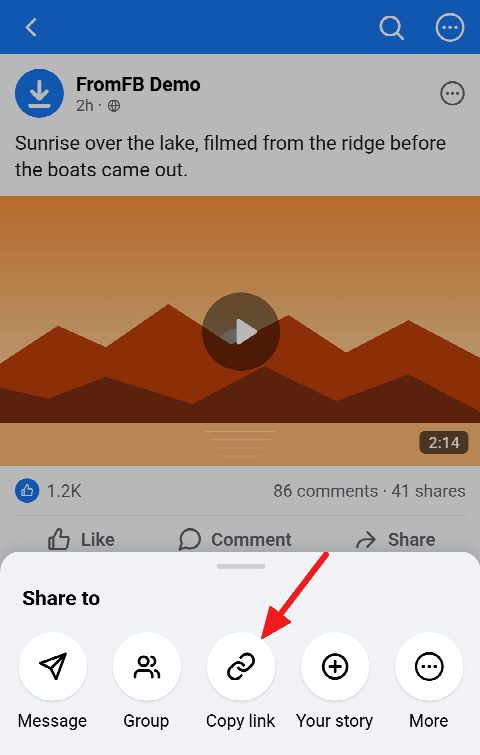
Copy the link
Choose Copy link. It looks like facebook.com/watch?v=…, facebook.com/…/videos/… or fb.watch/… — any of them works, and so does a facebook.com/share/v/… link from the app.
-
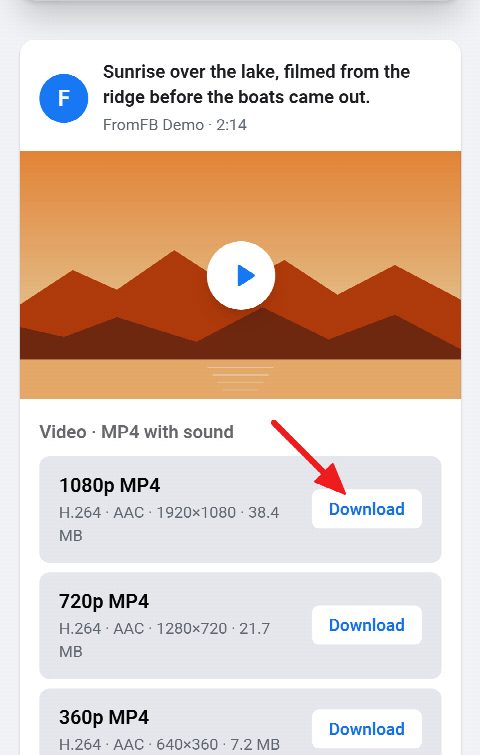
Paste and download
Paste the link into the field above and press Download. The video is found in a few seconds: pick 1080p, 720p or a smaller size, and the MP4 is saved to your device with its sound.


Download Facebook Videos in HD with Sound
-
Full HD 1080p and HD 720p
Every size Facebook keeps for the video is offered — 1080p, 720p, 480p, 360p — so you choose between the sharpest picture and the smallest file.
-
Sound included, nothing re-encoded
Facebook stores its best sizes as picture and sound apart. We join the two on our server without re-encoding either, so the MP4 plays with its audio anywhere, in its original quality.
-
No watermark
The file is the video as it was published: no logo, no username stamped over the picture, nothing added before or after it.
-
Any public video
Facebook Watch videos, videos on Pages and profiles, fb.watch share links, and videos in public posts and public groups — paste whichever link you have.
-
Audio as MP3 or M4A
Only need the sound? The same card offers it as an MP3 at up to 320 kbps, or as the original M4A, next to the video sizes.
-
Free, no login, any device
An online FB video downloader with no account, no app, no extension and no daily limit. It runs in the browser on iPhone, iPad, Android, Windows PC, Mac and Linux.
Supported Links: Watch, fb.watch, Page Videos and Public Posts
Facebook gives the same video several addresses, depending on where you found it and how you copied it. All of them lead to the same file here, so there is no need to tidy a link before you paste it.
Facebook Watch and Page videos
A video on the Watch tab has an address like facebook.com/watch?v=…, and one on a Page or a profile looks like facebook.com/…/videos/… Older video.php?v=… links still work as well.
fb.watch and share links
The Facebook app usually copies a short fb.watch/… link or a facebook.com/share/v/… one. Both are followed to the video they point at, so paste them as they are.
Videos in public posts and groups
Paste the link to a public post, or to a post in a public group, and every video in it is found, with the same sizes and sound as any other. A post that mixes several videos and photos shows all of them on one card.
Save Facebook Videos on iPhone, Android, PC and Mac
The download is an ordinary MP4 file, so where it ends up depends only on your device and browser.
iPhone and iPad
In Safari the video goes to Downloads in the Files app. Open it there, tap Share and choose Save Video to put it in Photos, next to the rest of your camera roll.
Android
Chrome saves the MP4 to the Downloads folder, and most gallery apps pick it up from there on their own. There is nothing to install and no permission to grant.
Windows PC and Mac
The file lands in your Downloads folder and plays in any player — the Windows Media Player, QuickTime or VLC. A computer is also the easiest place to get the link: copy it from the address bar while the video plays.
What Can’t Be Downloaded: Private Videos, Stories and Videos Over 5 Minutes
This downloader never logs in to Facebook. It sees exactly what a visitor without an account sees, so a private video, a video shared with friends only, a post in a closed group, a Story or a video sent in Messenger can’t be saved here.
Videos are also limited to 5 minutes. That covers clips, trailers, Reels and most posts; a longer video, such as a full episode or a recorded live stream, is refused with a message that says so rather than cut short.
Save videos for your own use, and ask the owner before you share or reuse one. The rights stay with whoever made it.
Frequently asked questions
Is this Facebook video downloader free and unlimited?
Yes. There is no fee, no account and no daily cap. After a run of downloads you may be asked to confirm you are not a robot, and that is all.
Can I download Facebook videos in 1080p without a watermark?
Yes, whenever the video was uploaded in 1080p: every size Facebook keeps is offered, up to Full HD, and none of them carries a watermark. A video uploaded in a lower resolution can’t be made sharper than its original.
How do I download a Facebook video on iPhone?
Copy the video’s link in the Facebook app, paste it into this page in Safari and press Download. The MP4 is saved to Downloads in the Files app; open it and tap Share, then Save Video, to move it to Photos.
Where are downloaded videos saved?
Wherever your browser saves downloads: the Files app on iPhone and iPad, and the Downloads folder on Android, Windows and Mac.
Is there a length limit?
Yes, videos can be up to 5 minutes long. A longer one is refused with a message rather than cut short.
Why won’t my Facebook video download?
Usually the video isn’t public — it is shared with friends only, sits in a closed group or is a Story — or it runs longer than 5 minutes, or it has been deleted. If it plays in a private browser window where you are not signed in to Facebook, it should work here.
Can I download private Facebook videos?
No. This tool never logs in to Facebook and can only see what is public. It never asks for your Facebook password, and no downloader should.
Can I download Facebook Reels here?
Yes, a Reel link works on this page too. For Reels there is also the Facebook Reels Downloader on our home page.
Guides
- How to Download Facebook Videos on iPhone and Save Them to Photos
- How to Download Facebook Videos on Android
- How to Download Facebook Videos on Windows PC and Mac
- How to Download Videos from a Facebook Group
- How to Download All Your Own Facebook Photos and Videos
- How to Copy a Link on Facebook: Post, Video, Reel, Profile, Page or Group
- What Is an fb.watch Link?
- Why Can’t I Download a Facebook Video? Reasons and Fixes
- Where Do Facebook Downloads Go on Your Phone or Computer?
- How to Share a Facebook Video to Your WhatsApp Status
- Facebook Saved Videos: Where to Find Them and How to Download Them