Facebook Video & Reels to GIF Converter
Paste the link to a public Facebook video or Reel, pick the moment you want and turn it into an animated GIF — no download first, no upload and no watermark. Set the clip to a tenth of a second, choose the width and the frame rate, and save the GIF on iPhone, Android or PC. Free, with no login.
How to Convert a Facebook Video to GIF
-
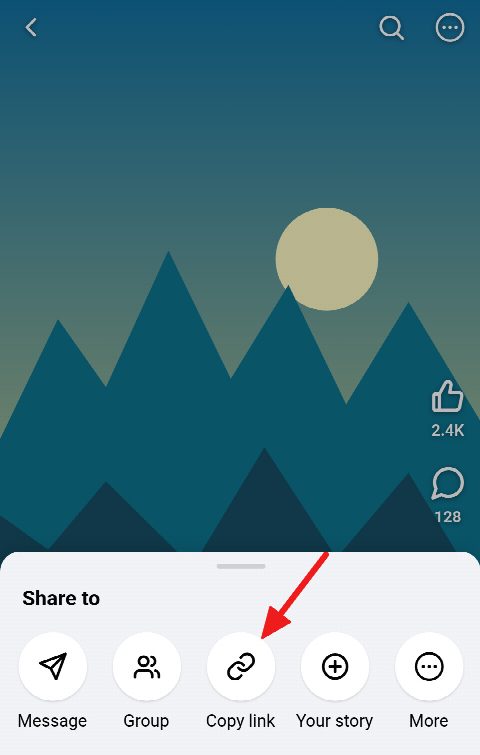
Copy the video or Reel link
In the Facebook app or a browser, open the video or Reel, tap Share and choose Copy link.
-
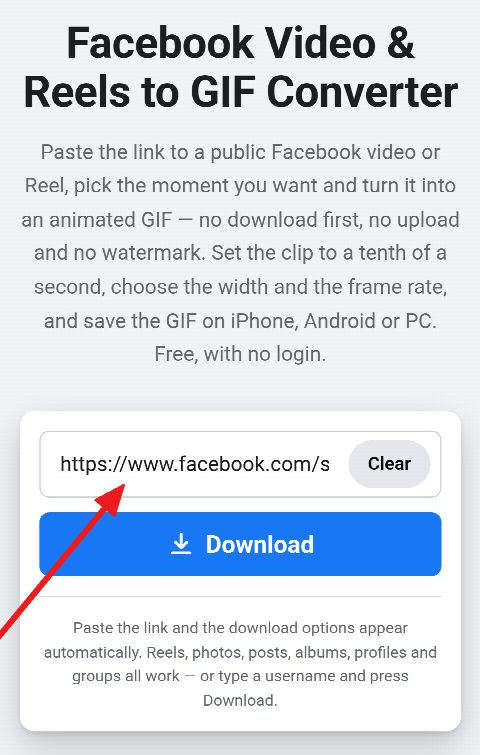
Paste it and pick the clip
Paste the link into the field above and press Download. Move the Start and End sliders to the moment you want, and press Preview to watch it loop the way the GIF will.
-
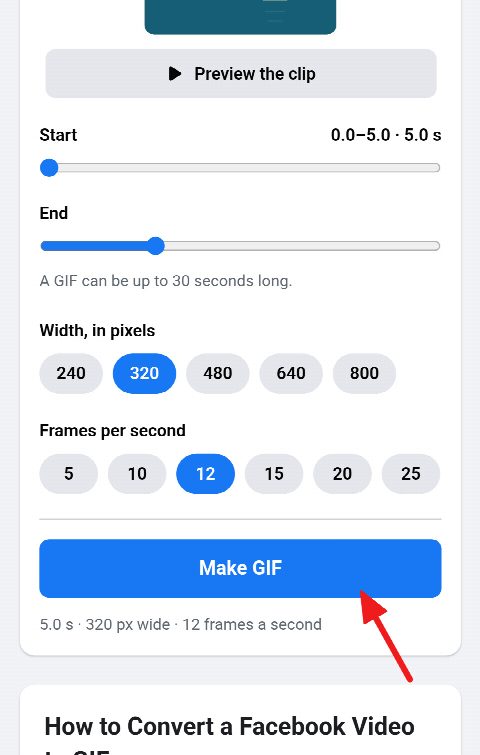
Make the GIF and download
Choose a width and a frame rate and press Make GIF. The GIF appears on the card and is saved to your device.


Make a GIF from a Facebook Video Link — No Upload
-
A link instead of an upload
Most converters want the video file first. Here the link is enough: the video is fetched for you, and only the finished GIF comes back.
-
Clip to a tenth of a second
Two sliders set where the GIF starts and ends, anywhere in the video, for up to 30 seconds — and the preview loops it before you make it.
-
Width and frame rate
Pick a width from 240 to 800 pixels — never wider than the video — and 5 to 25 frames a second: smaller and slower for a light GIF, larger and smoother for a sharp one.
-
No watermark
The GIF carries the frames you chose and nothing else — no logo, no caption, no site name across the picture.
-
Reels and videos
Reels, Facebook Watch videos, Page videos and videos in public posts all work, from their own links or the share links the app copies.
-
Free, no login, any device
No account, no app and no extension: it runs in the browser on iPhone, Android, Windows PC, Mac and Linux.
Make a GIF from Facebook Reels
Reels are short, loud and made to be shared, which is exactly what makes them good GIF material: a reaction, a punchline, a move worth replaying. Paste the Reel’s link — facebook.com/reel/…, or the facebook.com/share/r/… link the app copies — and the maker opens on the card with the Reel ready to cut.
A Reel is vertical, and so is its GIF. For a tall video the maker starts at 320 pixels wide, about 570 tall, which plays smoothly in a chat without filling the screen; choose 480, 640 or 800 for a sharper one.
Choose the Clip, Width and Frame Rate
The Start and End sliders move in tenths of a second, and the video jumps to the frame each one stands on, so you can see exactly where the GIF begins and ends. Press Preview to watch the stretch loop, the way the finished GIF will play.
The width sets how large the GIF is, and the frame rate how smoothly it moves. 12 frames a second is the usual balance for a GIF; 20 or 25 looks closer to the video and weighs more, while 5 or 10 is plenty for a slow scene or a short loop.
Tips for a Smaller, Smoother GIF
A GIF stores every frame as a picture of up to 256 colours, so it weighs many times what the same seconds of video do. Three things decide its size: how long it runs, how wide it is and how many frames a second it has. Halve any one of them and the file shrinks by about as much.
For a chat or a forum, 3 to 6 seconds at 320 pixels and 12 frames a second is a good start. If the maker says a GIF would be too large, shorten the clip first, then lower the frame rate, then the width. Calm scenes with few colours come out smallest; fast cuts and confetti cost the most.
Frequently asked questions
Is the Facebook video to GIF converter free, and is there a watermark?
It is free, with no account and no limit on how many GIFs you make, and the GIF has no watermark. After a run of GIFs you may be asked to confirm you are not a robot, and that is all.
Can I turn a Facebook Reel into a GIF?
Yes. Paste the Reel’s link the same way as a video’s; the GIF keeps the Reel’s tall shape.
How long can the video and the GIF be?
The video can be up to 5 minutes long, and the GIF up to 30 seconds of it. Pick any stretch within the video, to a tenth of a second.
Why does my GIF have no sound?
The GIF format has no sound at all. For a clip with its sound, save the video as an MP4 with the Facebook Video Downloader, or just the audio with the Facebook to MP3 converter.
Why is my GIF so large, and how do I make it smaller?
A GIF stores every frame as a picture of its own, so it grows quickly. Shorten the clip, lower the frame rate or pick a smaller width — each makes the file smaller. A GIF over 50 MB is not kept, and the maker tells you so.
Can I download GIFs from Facebook comments?
No. The GIFs in comments come from GIPHY and Tenor rather than from a Facebook video, so this tool can’t fetch them. It makes GIFs from public videos and Reels.
Where can I use the GIF?
Anywhere that takes a GIF: Discord, Slack, WhatsApp, Telegram, forums, emails and slides. The video still belongs to whoever made it, so ask before you use it publicly.